|
|
|
FSFlyingSchool PPL
 
Group: Forum Members
Last Login: Sunday, November 10, 2019 2:38:28 PM
Posts: 26,
Visits: 120
|
|
Hi Guys:
Yep a nubie but I got the software finally loaded but when I create a flight using two of the airports in FSFS and pick a C-172 as my airplane it does not match up with each other. I'm starting out taxing and when I get to the end of the runway FSFS is confused or maybe its me or maybe its me Anyway can anyone give me a simple flight plan that works with FSFS? I'd appreciate it. Anyway can anyone give me a simple flight plan that works with FSFS? I'd appreciate it.
Simple Instruction would be appreciated.
Thanks,
|
|
|
|
|

FSFlyingSchool Training Captain
Group: Moderators
Last Login: Tuesday, December 20, 2022 2:42:12 PM
Posts: 1,645,
Visits: 14,276
|
|
| Hi clayrb Now I might be shooting waaay below your cababilities in flight, and if so, just remember that others may need it as clear as this, so dont get mad at me. Just skip what you already know.... Open your Flight Simulator. 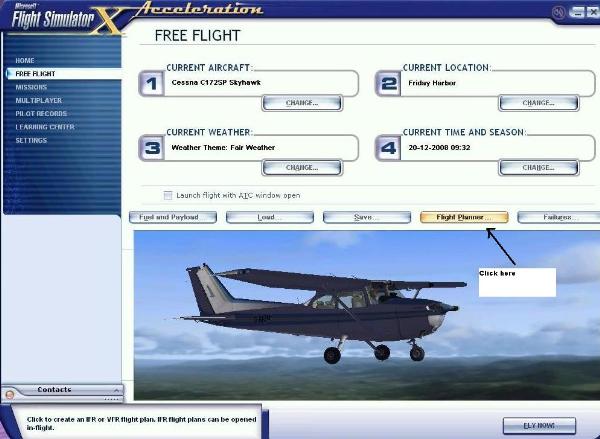 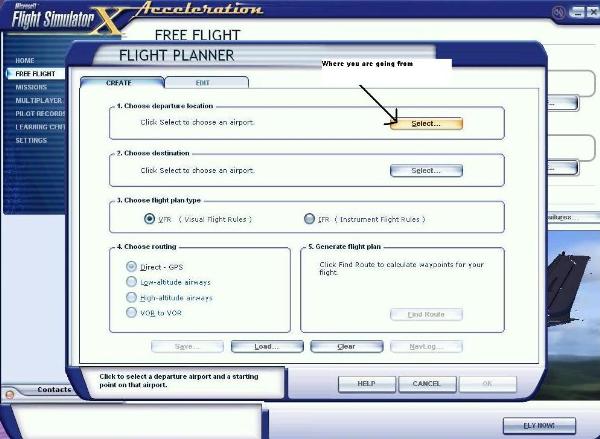
Bring up the Flight planner. Click the departure airport.
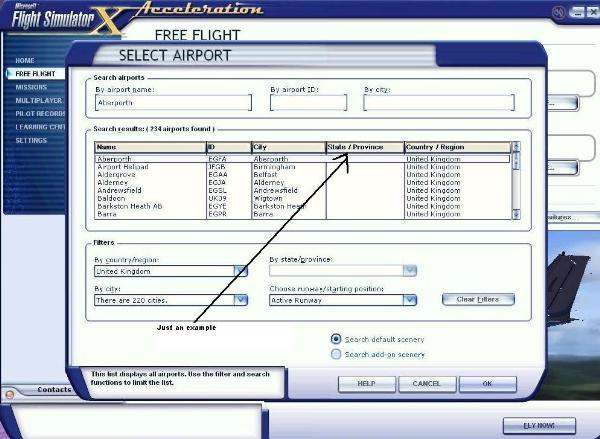 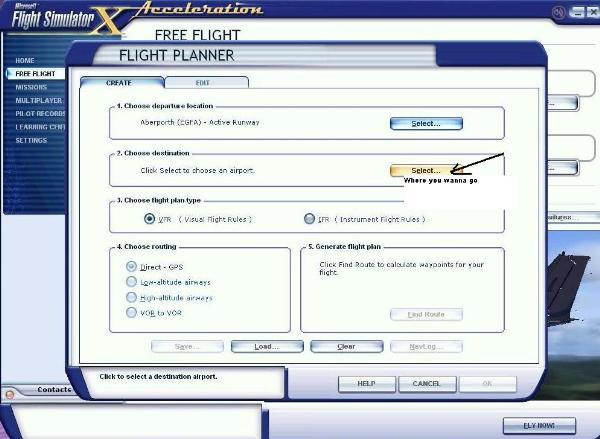
Choose your preferred airport to take off from. - click ok now choose destination airport
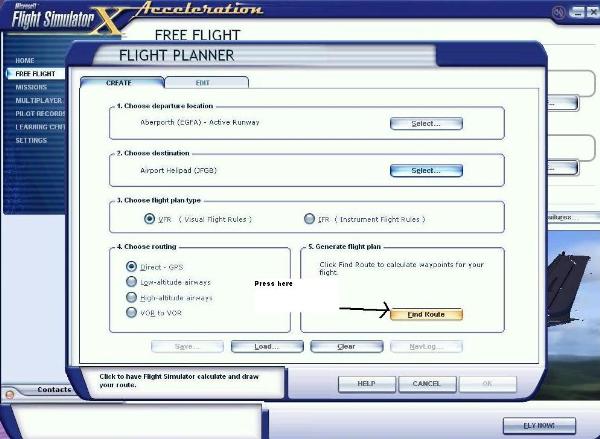 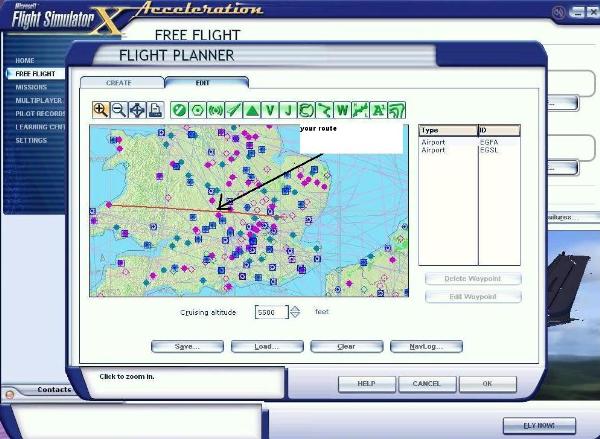
choose your destination airport - and click OK - then press "find route" Here it is
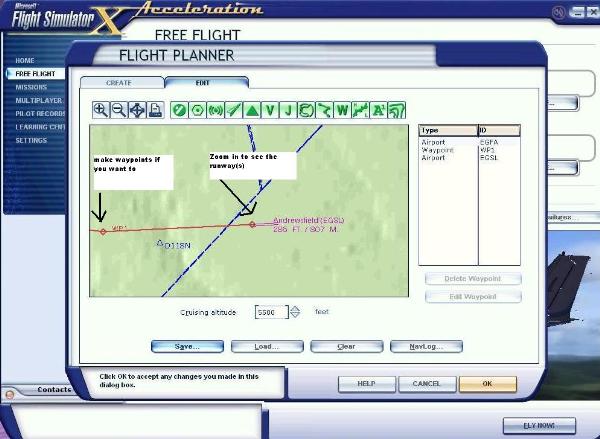 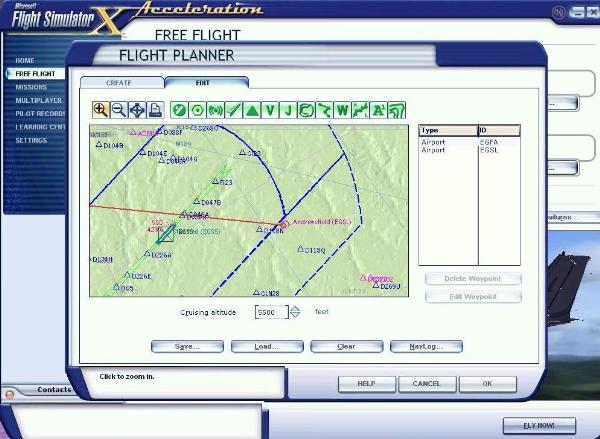
make waypoints if you need to, and zoom in and out to see the runway and -route. When you are finished, SAVE the flightplan by pressing SAVE
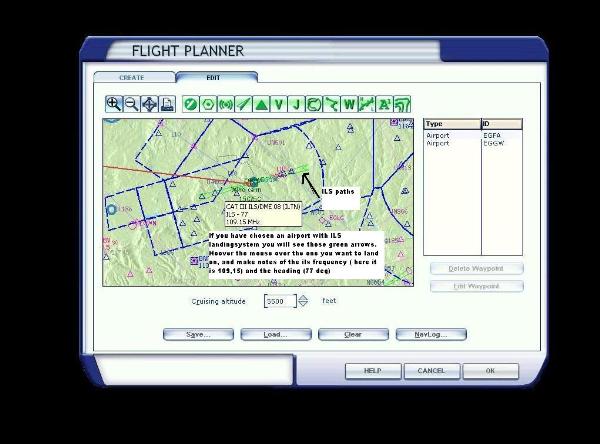
Now if you had chosen an airport with ILS landingsystem you would have seen those green arrows showing the ILS landings. Hoover over one and see the ILS frequency and heading. Make a note of both.
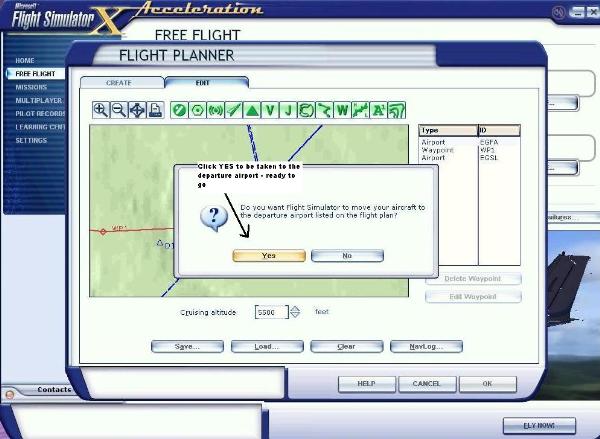
Now click yes to have your plane moved to the arrival airport, and click "Fly now"
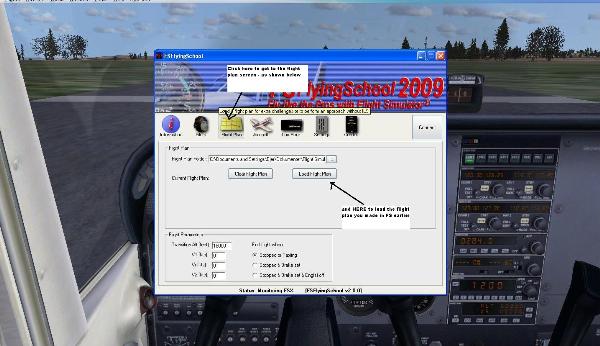 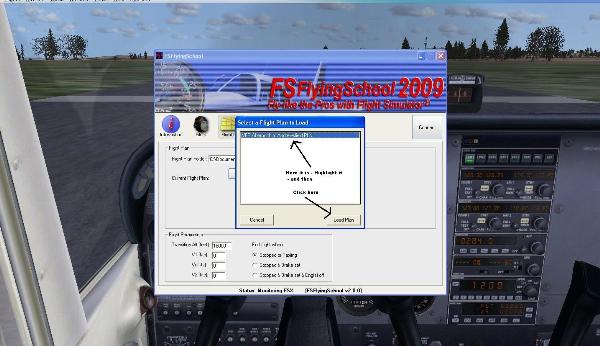
Now and not before now, you start FSFlyingschool. Choose Flight plan, and "load flight plan" Choose the one you just made (identify by ICAO codes) and click "load plan"
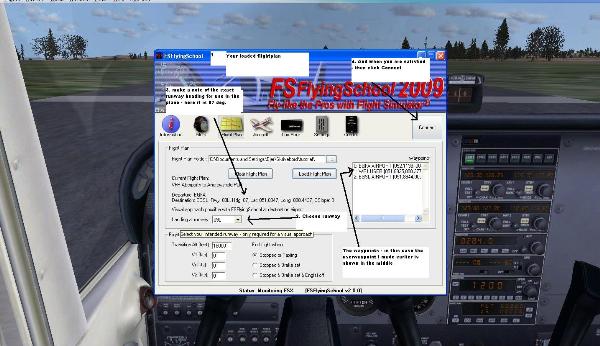 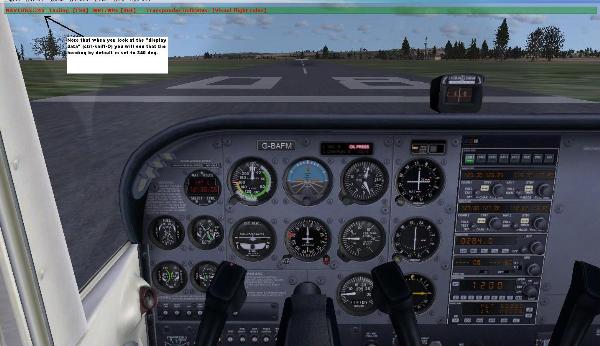
Now you can see your flightplan. Make a note of the heading (just above the runway nr.) Click "Connect" and alt tab back to FS Display data by pressing Ctrl-shift-D and see that FSFlyingschool by default has the heading set to 340 degrees.
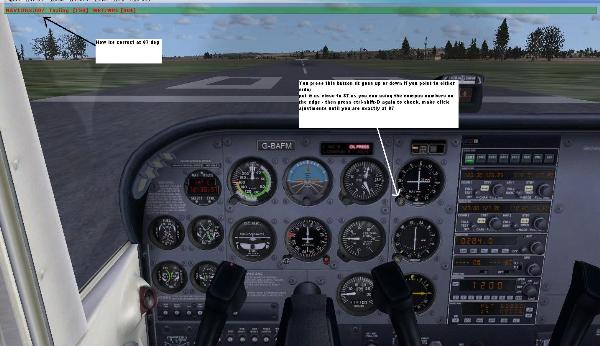 
Press on either the left or right side of the OBS button to change the 340 to 87 (use the compas rose to get close) use the Ctrl-shift-D to check that you are exactly there, click the OBS until its at 87 deg. for this NON-ILS runway.
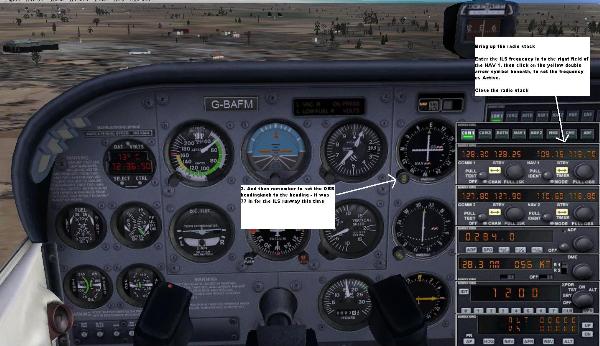
If you have chosen an ILS runway, you need to bring up the radiostack and thange the NAV1 frequency to the ILS freq. you wrote down earlier. (it was 109,15 - remember?) click the double arrow symbol to make the selection active. - and again use the OBS knob to set the exact heading (for this ILS runway it was 77 degrees)
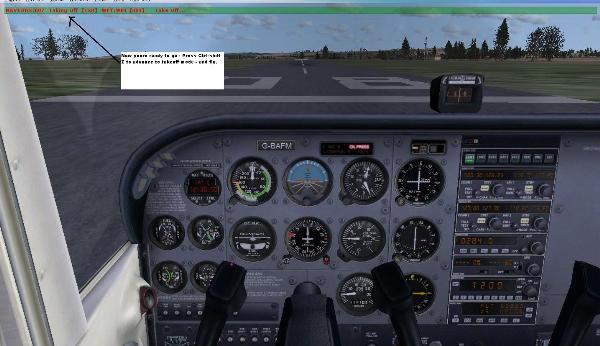
THATS IT! Now press Ctrl-Shift-Z to advance to "takeoff mode" and take off. Happy Flying. 
Regards
Ole Andreasen, Denmark
|
|
|
|
|
FSFlyingSchool PPL
Group: Forum Members
Last Login: Sunday, November 10, 2019 2:38:28 PM
Posts: 26,
Visits: 120
|
|
WOW watch what you ask for Many thanks for all of the information and greatly appreciate it,,,,,,,,,,,,,,,,,,,,,,,,,,,,it helps
Clayrb
|
|
|
|
|

FSFlyingSchool First Officer
Group: Forum Members
Last Login: Thursday, December 26, 2013 2:31:59 AM
Posts: 46,
Visits: 238
|
|
|
|
|
|

FSFlyingSchool Developer
Group: Administrators
Last Login: Wednesday, December 20, 2023 2:22:17 AM
Posts: 340,
Visits: 2,674
|
|
Fantastic help Ole!
We'll have to pin this topic as it's a perfect example. 
|
|
|
|
|
FSFlyingSchool PPL
Group: Forum Members
Last Login: Sunday, November 10, 2019 2:38:28 PM
Posts: 26,
Visits: 120
|
|
Yep leave it to a nebie to bring the best out of the "old" experienced ones
Merry Christmas and Prayer for a great New Year to all
|
|
|
|
|

FSFlyingSchool Developer
Group: Administrators
Last Login: Yesterday @ 4:09:25 AM
Posts: 5,065,
Visits: 9,189
|
|
| What a fantastic Christmas gift from Ole! Many, many thanks buddy - you've done a great service to everyone. This is a guy who enjoys FSFS - Ole is not an employee of FSInventions. As Dr Watson said of Sherlock Holmes: "His work is its own reward." 
Jeff Preston ('Squadron Leader') - FSFlyingSchool Publisher & Lead Developer
FSFlyingSchool 2023 for Microsoft Flight Simulator
FSFlyingSchool 2023 for X-Plane 12 & 11
FS Instant Approach 2023 for X-Plane 12 & 11 (Windows)
FSFlyingSchool PRO 2020 Prepar3D v 5
FSFlyingSchool PRO 2019 FSX, FSX-SE, FS2004
FSFlyingSchool USA for Microsoft Flight Simulator
FS Instant Approach 2019 for X-Plane 11 (Mac)
FS Instant Approach for Microsoft Flight Simulator
FS Instant Help for FSX, FS2004
Winner of 5 consecutive PC Pilot Magazine 'Classic Product' Awards
Fly like the Pros with X-Plane, Flight Simulator and Prepar3D!
If you wish to unsubscribe simply reply to email with the word UNSUBSCRIBE in the SUBJECT line.
|
|
|
|
|
FSFlyingSchool Captain
Group: Forum Members
Last Login: Sunday, January 29, 2023 1:59:57 PM
Posts: 142,
Visits: 546
|
|
| Hi Ole, First class job ole five stars joseph767uk1
|
|
|
|
|

FSFlyingSchool Captain
Group: Forum Members
Last Login: Sunday, March 22, 2015 6:40:24 AM
Posts: 117,
Visits: 363
|
|
| WOW!!!!!!!!! Professor Ole has done it again folks! He is a Genius when it comes to these Tech issues.  Ole, your are Ole, your are  Smooooth!!!!!!!!!!! Smooooth!!!!!!!!!!! Great piece of work, holy toledo! Nice!  Post Reference: http://www.fsflyingschool.com/forum/FindPost3091.aspx Post Reference: http://www.fsflyingschool.com/forum/FindPost3091.aspx Keep up the great work! Thank's for the lesson Professor Ole. Cheers as always! Best Regards, CaptGarrick.
Best Regards, Garrick Pattenden
Founder / CEO
Canadian Aviation Software
FSFlyingSchool PRO 2013 FSX, FS2004
Windows 7 x64 Home Premium.
|
|
|
|
|
FSFlyingSchool PPL
Group: Forum Members
Last Login: Saturday, January 07, 2012 2:07:26 PM
Posts: 14,
Visits: 44
|
|
| EVERYTHING IS GREAT ON THIS RESPONSE ONLY ONE THING I WOULD LIKE TO SEE. WHEN I GET TO THE OPEN FSSCHOOL I CANNOT GET TO WINDOWS TO OPEN IT. TELL ME HOW YOU DO THAT. PLEASE.
|
|
|
|