|
|
|

FSFlyingSchool Developer

Group: Administrators
Last Login: Saturday, April 06, 2024 3:28:36 AM
Posts: 5,065,
Visits: 9,188
|
|
| FSFlyingSchool must be able to run with Administrator Privilege Level set. Do not worry about this if you are not experiencing any problems, but if you are... Make sure that FSFlyingSchool is running with the correct Windows Privilege Level.
Open the Properties of your FSFlyingSchool shortcut
(just right click on whatever it is you normally left click on to launch FSFlyingSchool)
and then
on the Compatibility tab, look for a setting for Privilege Level. If your version of Windows has such a setting, check that the Privilege Level is set to:
"Run this program as an administrator" (see image below).
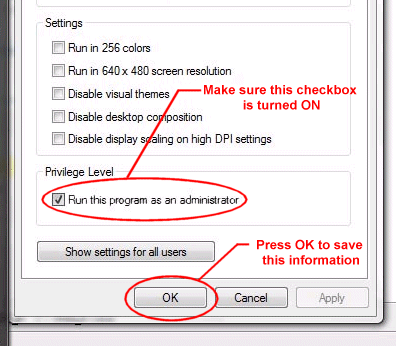
Now...
1. If it was already turned on - you're all set!
2. If it was NOT already turned on, make sure it is, and then, with no other programs running, please launch FSX, get yourself set up to fly (on a runway, at a gate, or taxiing) and then launch FSFlyingSchool and press connect.
That's it!
Jeff Preston ('Squadron Leader') - FSFlyingSchool Publisher & Lead Developer
FSFlyingSchool 2023 for Microsoft Flight Simulator
FSFlyingSchool 2023 for X-Plane 12 & 11
FS Instant Approach 2023 for X-Plane 12 & 11 (Windows)
FSFlyingSchool PRO 2020 Prepar3D v 5
FSFlyingSchool PRO 2019 FSX, FSX-SE, FS2004
FSFlyingSchool USA for Microsoft Flight Simulator
FS Instant Approach 2019 for X-Plane 11 (Mac)
FS Instant Approach for Microsoft Flight Simulator
FS Instant Help for FSX, FS2004
Winner of 5 consecutive PC Pilot Magazine 'Classic Product' Awards
Fly like the Pros with X-Plane, Flight Simulator and Prepar3D!
If you wish to unsubscribe simply reply to email with the word UNSUBSCRIBE in the SUBJECT line.
|
|
|
|
|
FSFlyingSchool Pilot

Group: Forum Members
Last Login: Wednesday, March 11, 2009 12:22:10 PM
Posts: 9,
Visits: 27
|
|
I apologize for jumping the gun -- I made comment about the need for Administrator privileges earlier in another of your posts. I should have looked a bit further down the line.
Kind regards, \\Chuck
Green Student Pilot
|
|
|
|
|
FSFlyingSchool Developer
Group: Administrators
Last Login: Saturday, April 06, 2024 3:28:36 AM
Posts: 5,065,
Visits: 9,188
|
|
| Chuck: No problem - we like to hear from folks and especially like to hear about their own experiences of solving problems! 
Jeff Preston ('Squadron Leader') - FSFlyingSchool Publisher & Lead Developer
FSFlyingSchool 2023 for Microsoft Flight Simulator
FSFlyingSchool 2023 for X-Plane 12 & 11
FS Instant Approach 2023 for X-Plane 12 & 11 (Windows)
FSFlyingSchool PRO 2020 Prepar3D v 5
FSFlyingSchool PRO 2019 FSX, FSX-SE, FS2004
FSFlyingSchool USA for Microsoft Flight Simulator
FS Instant Approach 2019 for X-Plane 11 (Mac)
FS Instant Approach for Microsoft Flight Simulator
FS Instant Help for FSX, FS2004
Winner of 5 consecutive PC Pilot Magazine 'Classic Product' Awards
Fly like the Pros with X-Plane, Flight Simulator and Prepar3D!
If you wish to unsubscribe simply reply to email with the word UNSUBSCRIBE in the SUBJECT line.
|
|
|
|
|
FSFlyingSchool Pilot
Group: Forum Members
Last Login: Saturday, March 24, 2012 12:04:17 PM
Posts: 2,
Visits: 9
|
|
Thank you for that! I couldn't figure out how to make the FSFS 9 demo connect with FS 2004. Now all is well. I have ordered the full program but it hasn't arrived yet (CD version), so I am running the demo. I am using Windows 7 and thought the problems had to do with "permissions" and "security," and I was right, but your note told me how to fix it.
Happy New Year to all here - let Peace come TO you and THROUGH you all this new year.
BobR in New Mexico, USA
"Let there be peace on earth, and let it begin with me." This is our function, our challenge, our fulfillment - and our inheritance, to accept and to share.
|
|
|
|
|
FSFlyingSchool Pilot
Group: Forum Members
Last Login: Saturday, March 24, 2012 12:04:17 PM
Posts: 2,
Visits: 9
|
|
As an afterthought to my message from last night:
PLEASE put that "shortcut run as administrator" note in your user manual, under initial setup instructions. This is critical in both Windows 7 (which I now have) and, I assume, Windows Vista. 
It would have saved me hours of trouble to know about how to adjust that shortcut's setting. I had indeed set the files of both FSFlyingSchool and FS 2004 so that as the prime user, I'd have permission to change things, but I had overlooked the shortcut tip you wrote.
Happy New Year to all of you at FSFlyingSchool!
BobR in New Mexico, USA
"Let there be peace on earth, and let it begin with me." This is our function, our challenge, our fulfillment - and our inheritance, to accept and to share.
|
|
|
|
|
FSFlyingSchool Developer
Group: Administrators
Last Login: Saturday, April 06, 2024 3:28:36 AM
Posts: 5,065,
Visits: 9,188
|
|
| BobR: Thanks - we will do what we can to make this clear to folks. Good idea. Happy landings!
Jeff Preston ('Squadron Leader') - FSFlyingSchool Publisher & Lead Developer
FSFlyingSchool 2023 for Microsoft Flight Simulator
FSFlyingSchool 2023 for X-Plane 12 & 11
FS Instant Approach 2023 for X-Plane 12 & 11 (Windows)
FSFlyingSchool PRO 2020 Prepar3D v 5
FSFlyingSchool PRO 2019 FSX, FSX-SE, FS2004
FSFlyingSchool USA for Microsoft Flight Simulator
FS Instant Approach 2019 for X-Plane 11 (Mac)
FS Instant Approach for Microsoft Flight Simulator
FS Instant Help for FSX, FS2004
Winner of 5 consecutive PC Pilot Magazine 'Classic Product' Awards
Fly like the Pros with X-Plane, Flight Simulator and Prepar3D!
If you wish to unsubscribe simply reply to email with the word UNSUBSCRIBE in the SUBJECT line.
|
|
|
|
|
FSFlyingSchool Pilot
Group: Forum Members
Last Login: Tuesday, July 14, 2015 8:40:09 AM
Posts: 5,
Visits: 22
|
|
Hi, I have run fsfs2015 as administrator, however I receive this error when i start fsfs Error 75- Path/File access error Location WriteINIFile. I have checked the box to allow as admin and also right click then run as admin. I Just cant connect. can you assist please?
Thanks
Allan
|
|
|
|
|
FSFlyingSchool Developer
Group: Administrators
Last Login: Saturday, April 06, 2024 3:28:36 AM
Posts: 5,065,
Visits: 9,188
|
|
Hi Allan:
Sorry to hear this!  Some questions and suggestions... Some questions and suggestions...
1. Has FSFS ever run successfully on this PC?
2. Running FSFS in DEMO or registered mode?
3. Try installing FSFS to a new folder which is NOT inside the C:\Program Files (x86) folder on your PC. Windows treats that folder differently and this can lead to issues on a very few PCs.
You can tell the FSFS installer program where to install FSFS when you are installing. Tell it a different NEW folder, such as C:\FSFS
Then finally launch the program which you installed to your NEW folder, after having set it to always run as administrator (which you've reported you know how to do).
Please let me know how you get on.
Jeff Preston ('Squadron Leader') - FSFlyingSchool Publisher & Lead Developer
FSFlyingSchool 2023 for Microsoft Flight Simulator
FSFlyingSchool 2023 for X-Plane 12 & 11
FS Instant Approach 2023 for X-Plane 12 & 11 (Windows)
FSFlyingSchool PRO 2020 Prepar3D v 5
FSFlyingSchool PRO 2019 FSX, FSX-SE, FS2004
FSFlyingSchool USA for Microsoft Flight Simulator
FS Instant Approach 2019 for X-Plane 11 (Mac)
FS Instant Approach for Microsoft Flight Simulator
FS Instant Help for FSX, FS2004
Winner of 5 consecutive PC Pilot Magazine 'Classic Product' Awards
Fly like the Pros with X-Plane, Flight Simulator and Prepar3D!
If you wish to unsubscribe simply reply to email with the word UNSUBSCRIBE in the SUBJECT line.
|
|
|
|
|
FSFlyingSchool Pilot
Group: Forum Members
Last Login: Tuesday, July 14, 2015 8:40:09 AM
Posts: 5,
Visits: 22
|
|
Hi, i have installed all previous versions of FSFS without much hassle, I Have a new gaming pc which FSFS 2015 Has run on before, registered version. Have made a new folder as suggested, given permission again, yet still getting that error message when trying to run FSFS2015. I Have also FSUIPC latest version. can you assist please?
Thanks,
Allan
|
|
|
|
|
FSFlyingSchool Developer
Group: Administrators
Last Login: Saturday, April 06, 2024 3:28:36 AM
Posts: 5,065,
Visits: 9,188
|
|
Hi Allan:
>> I Have a new gaming pc which FSFS 2015 Has run on before
We're making progress!
If FSFS PRO 2015 has run on the PC before and is not able to do so now, then something has changed.
Can you tell me what has changed?
It could be several different things of course, but you might know something that I don't know about the PC as it was when FSFS was working, and what has since changed.
Changes to FSX? New version? Moved? Deleted? Reinstalled?
Changes to FSUIPC? New version? Moved? Deleted? Reinstalled?
Changes to FSFS? New version?
Other changes to Windows? Security software?
Jeff Preston ('Squadron Leader') - FSFlyingSchool Publisher & Lead Developer
FSFlyingSchool 2023 for Microsoft Flight Simulator
FSFlyingSchool 2023 for X-Plane 12 & 11
FS Instant Approach 2023 for X-Plane 12 & 11 (Windows)
FSFlyingSchool PRO 2020 Prepar3D v 5
FSFlyingSchool PRO 2019 FSX, FSX-SE, FS2004
FSFlyingSchool USA for Microsoft Flight Simulator
FS Instant Approach 2019 for X-Plane 11 (Mac)
FS Instant Approach for Microsoft Flight Simulator
FS Instant Help for FSX, FS2004
Winner of 5 consecutive PC Pilot Magazine 'Classic Product' Awards
Fly like the Pros with X-Plane, Flight Simulator and Prepar3D!
If you wish to unsubscribe simply reply to email with the word UNSUBSCRIBE in the SUBJECT line.
|
|
|
|